

See how accessible your stop is
Is a stop accessible for wheelchairs? Is the access to the stop step-free? Is there tactile guidance paving present? You can now look up this information on the 9292 website.
Are you curious about the accessibility of the stations and stops along your journey? On the 9292 website, you can find the following information for each stop:
Wheelchair accessible?
Step-free access?
Tactile guidance paving present?
For each stop, we show the different sides of the street. This is clearly displayed on a map.
At this time, the map is only visible to visitors using a large screen. We are working hard to make the map available on smaller screens as well.
How to look up accessibility information of your stop
There are two ways of looking up the accessibility of a stop: via the stations & stops page, or via your travel advice.
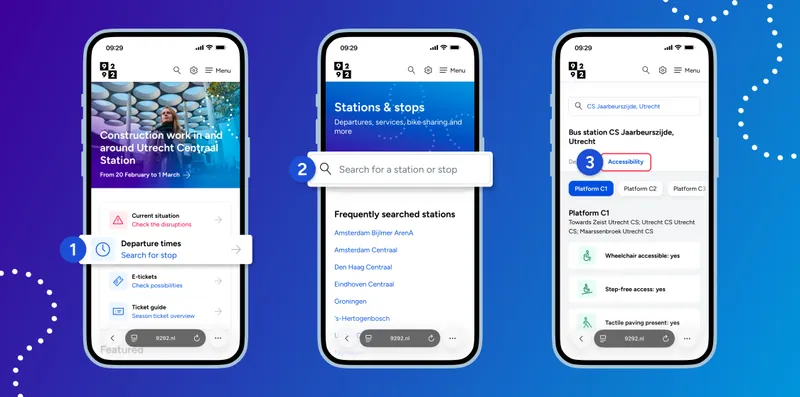
Via the stations & stops page
Search for the stop you want more information about.
Select the 'Accessibility' tab.
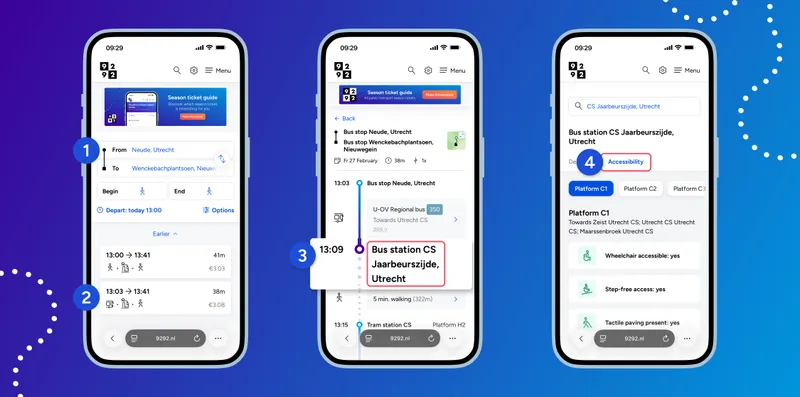
Via your journey advice
Select a travel advice.
In your selected travel advice, tap one of the stops along your route.
Select the 'Accessibility' tab.